Sonnar records your meeting, transcribes it by speaker and a couple of minutes later sends a summary and tasks. On the Pro plan it joins calls from your calendar on its own. All you have to do is talk
Free plan forever · no card · data in Russia · deletion means deletion
app.ai-sonnar.ru
Launch stand-up
Recording
Date
Today, 10:00
Duration
18 min
Participants
Alex36%Marina30%Dmitry34%
SummaryTranscript
Alex
Marina, how is the design going?
Marina
Mockups are done, I’ll finish the payment screen by Thursday
Dmitry
Notifications don’t work on older Android yet — I need two more days
Alex
Then we move the release to November 14
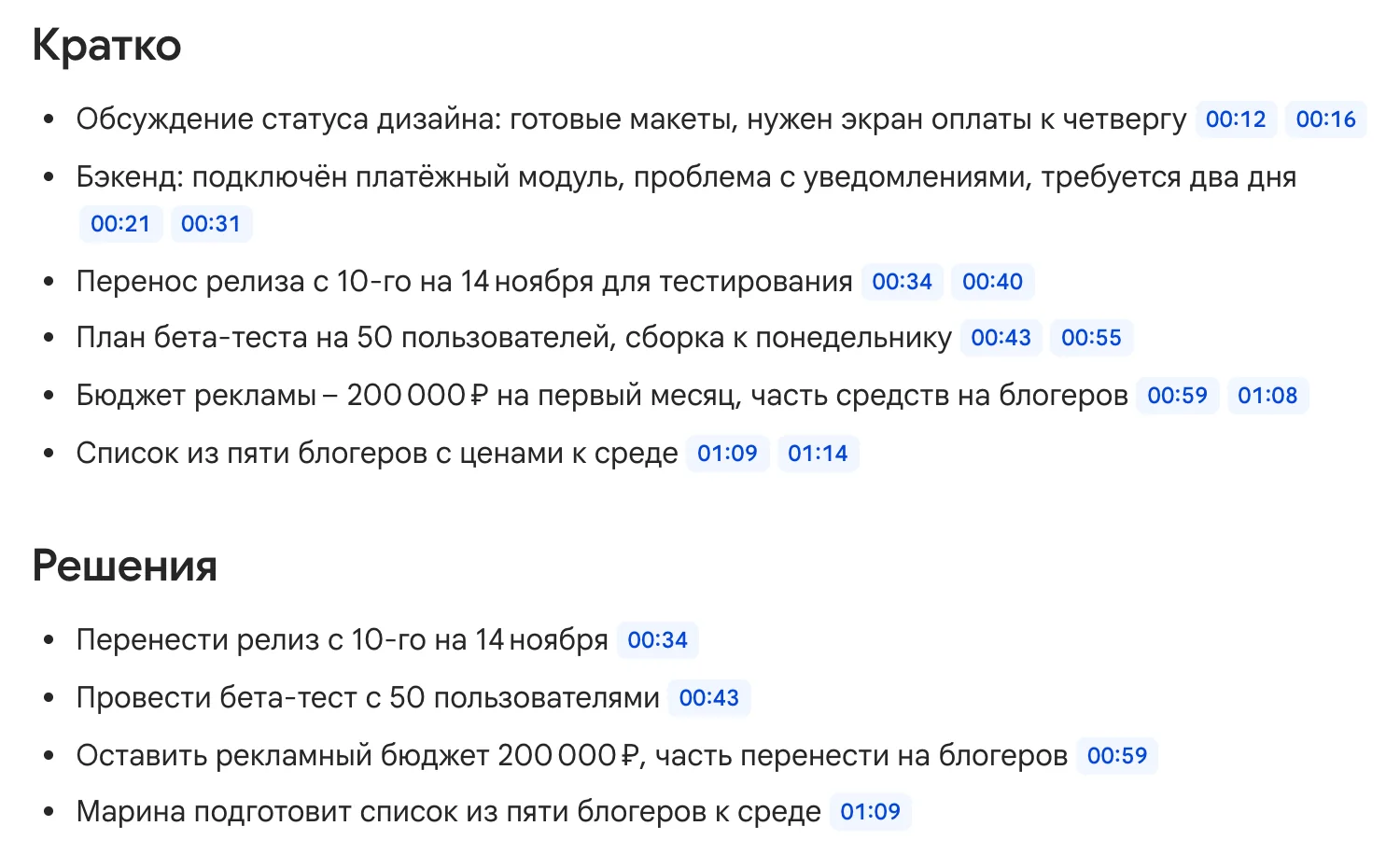
Key points
Release moves to November 1400:34
Mockups done, payment screen by Thursday00:09
Notifications: two more days00:21
Tasks and agreements
Finish the payment screenMarinaby Thursday
Fix notifications on AndroidDmitryby Monday
Sonnar is listening
Recap in a couple of minutesTranscript, summary and tasks
0 ₽2 hours of transcription free — every single month
50+ready-made summary and minutes templates
EN + RUeven when people mix languages
Russiarecordings are stored and processed in Russia
The bot joinsPro and Team
Recordings fromfrom Personal
Files and in-browser recording — every plan
Tasks toPro and Team
Yandex Tracker — soon
AI assistantsvia MCP
Everything a meeting leaves behind
Not an hour of audio but a clear recap: who said what, what was decided and who does what
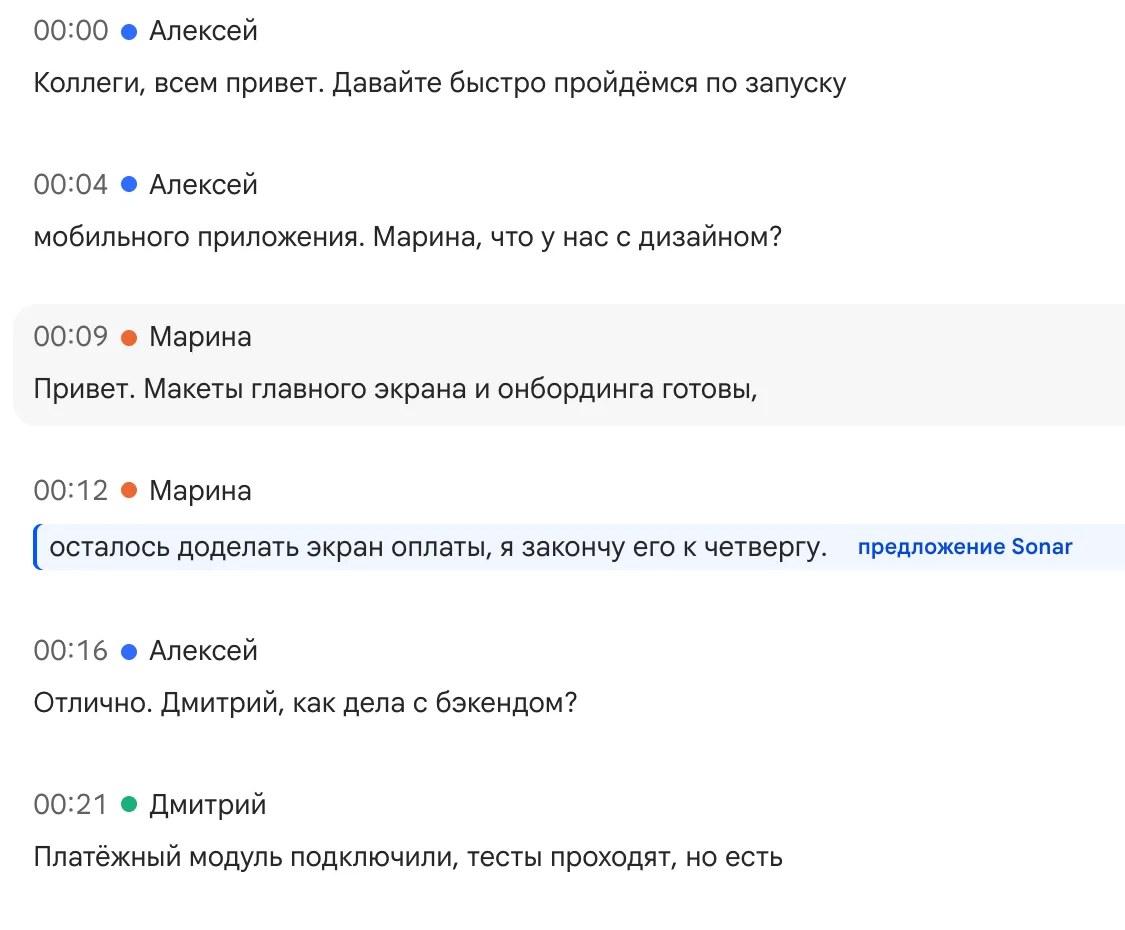
Transcript by speaker
Lines split by participant, with timecodes. English and Russian — even mixed
Alexey
Hi everyone. Let’s quickly go over the launch
Alexey
of the mobile app. Marina, how’s the design going?
Marina
Hi. The home screen and onboarding mockups are ready,
Marina
the payment screen is left, I’ll finish it by Thursday.Sonnar suggestion
Alexey
Great. Dmitry, how’s the backend?
Dmitry
The payment module is connected and tests pass, but there’s
Tasks straight to the board
Who promised what and by when — as cards with an owner and a date
New from meetings6
Mobile app launch stand-up
Finish the payment screen
MMarinadue Nov 3
LaterAdd to tasks
Mobile app launch stand-up
Fix notifications and build the beta
DDmitrydue Nov 2
LaterAdd to tasks
Mobile app launch stand-up
Move the release to November 14
due Nov 14
LaterAdd to tasks
Mobile app launch stand-up
Prepare a test build for the beta
To do0
New task
P
BotBrowserFilePlaud
Record from anywhere
In-browser recording or a file on any plan; Zoom, Plaud and Kontur.Talk from Personal; a bot on Pro
what did we decide on budget
Launch stand-up · 00:59…200,000 ₽ for the first month, part of it for bloggers
Search by meaning
Find the moment you discussed the budget — even if you don’t remember the exact words. Unlimited
Who owns the payment screen?
Marina, by Thursday Launch stand-up · 00:12
Ask the AI
Ask what was agreed this week — the answer comes from all your meetings, with links
app.ai-sonnar.ru/s/k7Qm…
SummaryTranscriptAudio
Share a link
Summary, transcript or audio — to colleagues with one link or by email
What Sonnar does for you
The real Sonnar interface — no mockups
01 · Bots
A bot joins the meeting for you
On the Pro plan, paste a link and the Sonnar bot is on the Telemost, Meet or Teams call within a minute. Connect your calendar and it joins on its own
Joins a minute before the start and leaves when everyone is gone
Auto-join from your calendar — nothing to paste
Shows up as a separate guest with a clear name
telemost.yandex.ru/j/12345678901234Send the botThe bot joins within a minute · Pro plan
Meeting recap
02 · Automations
Recaps go out on their own
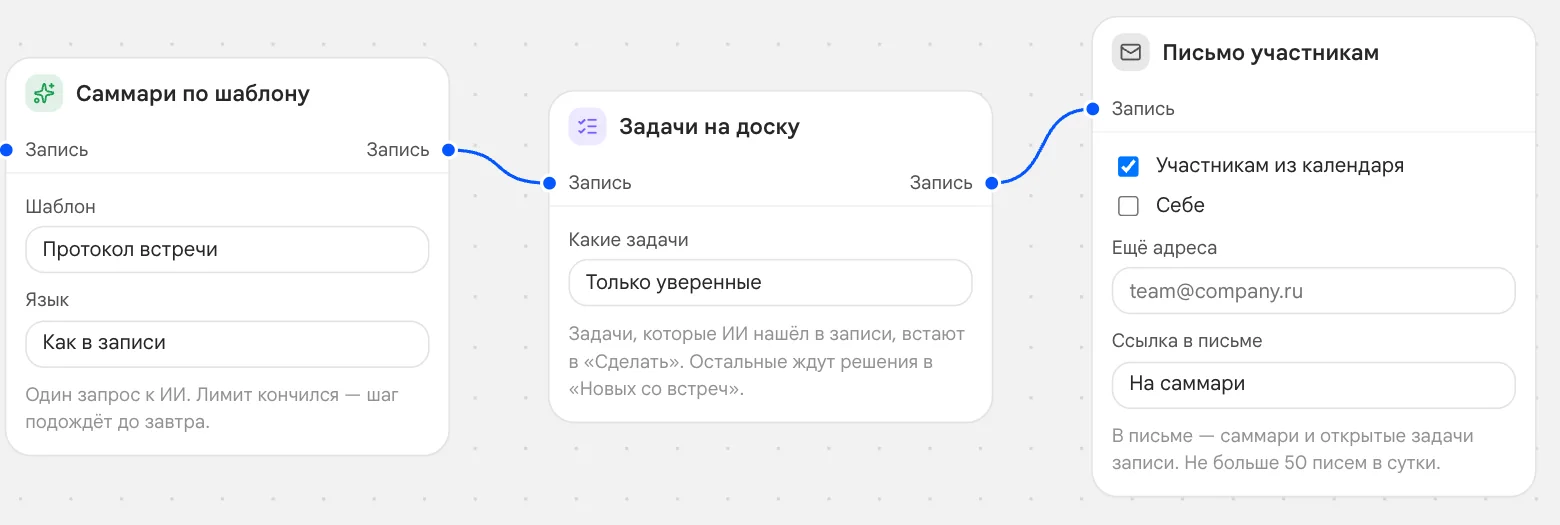
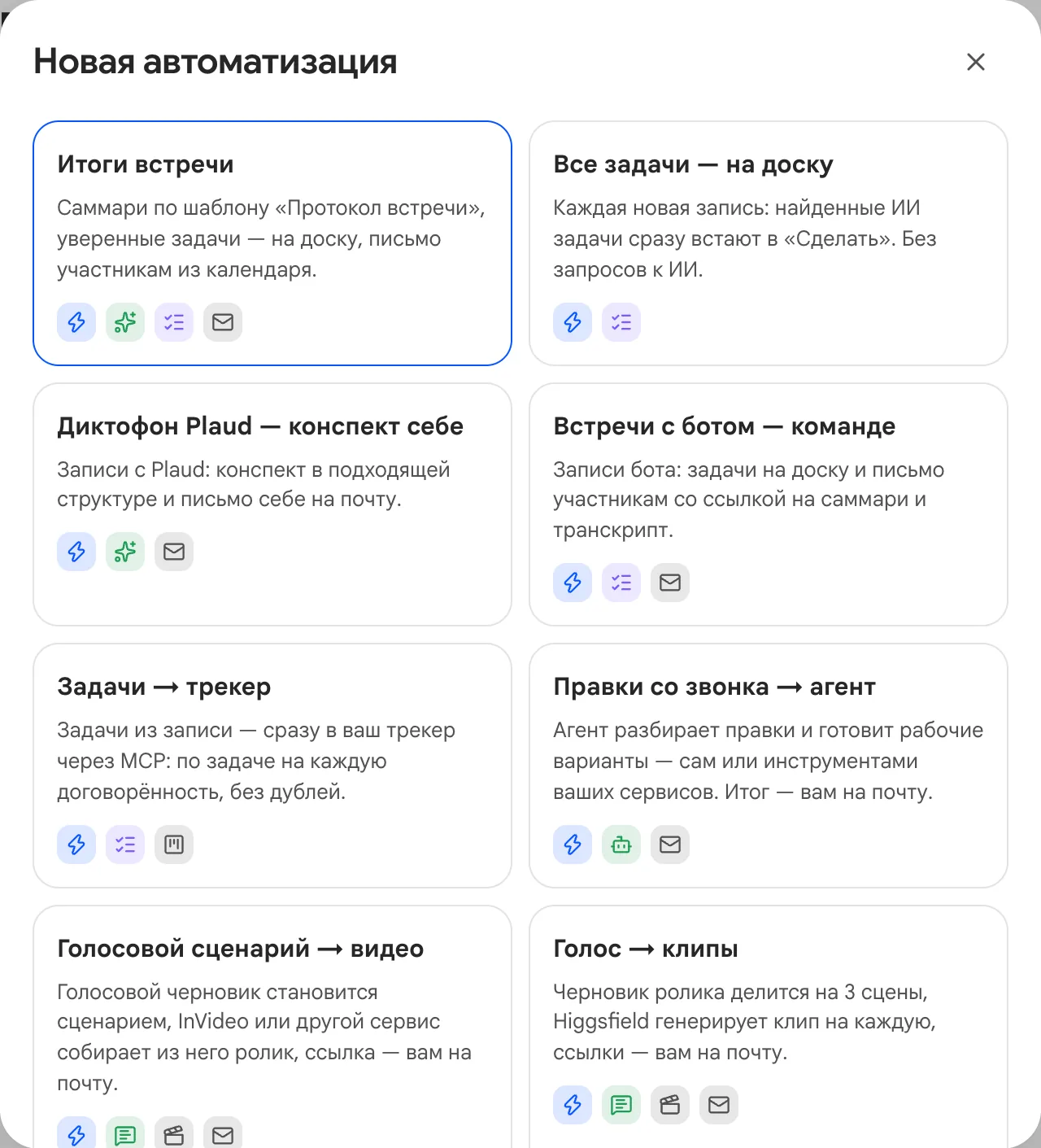
Set up what happens after a meeting: a summary, tasks, an email — no code. Available on Pro
Template summary, tasks to the board, email to participants
Tasks to your tracker, notes to your inbox, an AI agent for edits
Ready-made scenarios — start in a couple of clicks
Automations · Meeting recap
03 · Transcript editor
A transcript you can trust
In Sonnar a transcript is a living document. Fix a word and search and summaries know about it right away
Edit any line in one click, right while listening
See which line Sonnar found a task in
Name speakers once — the summary is rebuilt with names
Find and replace across the whole recording
Transcript
04 · MCP
Your meetings in your tools
Sonnar connects over MCP to Claude, ChatGPT and Cursor, and sends tasks to Jira, YouTrack, ClickUp and Notion
Assistants search your recordings and answer with links
A separate key for each tool — revoke it instantly
Yandex Tracker — coming soon
claude — ~/app
example
> What did we decide about the release?● sonnar · search_transcripts("release") ↳ Launch stand-up · 2 min · 3 participants
The release moved to November 14, with a
beta test for 50 users first. Dmitry fixes
notifications by Monday.
Integrations · AI assistants
AI assistants
Claude, ChatGPT and other assistants can search your recordings and summarize them (MCP).
https://…/mcp
MCP server address
Paste it into the assistant’s settings together with a key.
https://app.ai-sonnar.ru/mcp
The assistant gets access to all your recordings: matching excerpts go to its developer (Anthropic, OpenAI). A key is like a password: don’t publish it and revoke the ones you no longer need.
•••••••••
Access keys
Create a separate key for each assistant — so you can revoke it without touching the others.
Claudesnr_3ttSUu…created Oct 27
New key
e.g. ClaudeCreate
telemost.yandex.ru/j/12345678901234Send the botThe bot joins within a minute · Pro plan
Meeting recap
Automations · Meeting recap
Transcript
claude — ~/app
example
> What did we decide about the release?● sonnar · search_transcripts("release") ↳ Launch stand-up · 2 min · 3 participants
The release moved to November 14, with a
beta test for 50 users first. Dmitry fixes
notifications by Monday.
Integrations · AI assistants
AI assistants
Claude, ChatGPT and other assistants can search your recordings and summarize them (MCP).
https://…/mcp
MCP server address
Paste it into the assistant’s settings together with a key.
https://app.ai-sonnar.ru/mcp
The assistant gets access to all your recordings: matching excerpts go to its developer (Anthropic, OpenAI). A key is like a password: don’t publish it and revoke the ones you no longer need.
•••••••••
Access keys
Create a separate key for each assistant — so you can revoke it without touching the others.
Claudesnr_3ttSUu…created Oct 27
New key
e.g. ClaudeCreate
Privacy
Your meetings stay yours
Recorded conversations are the most personal thing a work tool can hold. We treat them that way
Only you have access
Recordings are visible only to their owner — not to other users or to assistants without your key
Data stays in Russia
Recordings and transcripts are processed and stored on servers in Russia
Keys under control
A separate key for each assistant. Revoking takes effect instantly
Deletion means deletion
Delete a recording or your whole account and the data goes with it
Start free, pay for what you need
Prices are per month with yearly billingPrices are per month with monthly billing
The summary of every recording does not count against the limit. AI questions cover the Ask chat, re-summarizing with another template, the canvas and routine setup. An automation run is one pass of the pipeline, however many steps it has. Counters reset monthly. Payment and refund terms are in the Terms of Use
The essentials
How does Sonnar get into a meeting?
On any plan, upload a recording or record the meeting in your browser. From Personal, recordings are pulled from Zoom, Plaud and Kontur.Talk. A SberJazz meeting created from Sonnar brings its transcript in by itself, no bot needed. On Pro and Team, the bot joins Yandex Telemost, Google Meet or Microsoft Teams as a regular participant — by link or from your calendar
How soon is the recap ready?
Usually a few minutes after the call ends. Long meetings are processed in parts, so even an hour-long call won’t keep you waiting
What if Sonnar gets a word wrong?
Fix the line right in the transcript or replace a word across the whole recording. Search and summaries pick up the edit right away
Which languages are supported?
English and Russian, including both mixed in one meeting
What is MCP and why do I need it?
It’s the standard that lets assistants like Claude and ChatGPT connect to external data. Create a personal key in Sonnar and your assistant can search your meetings and answer questions about them
Will participants know the meeting is being recorded?
Yes: the bot joins as a separate participant with a clear name. Let people know you are recording — the law requires it
Do I need a card to try it?
No. The free plan needs no card and has no time limit: 2 hours of transcription every month
Your next meeting will be remembered
Upload a recording or record a meeting right in your browser — the recap is ready in a couple of minutes